Projecting the Unit Circle onto the Surface z = x²y
Grades 11-12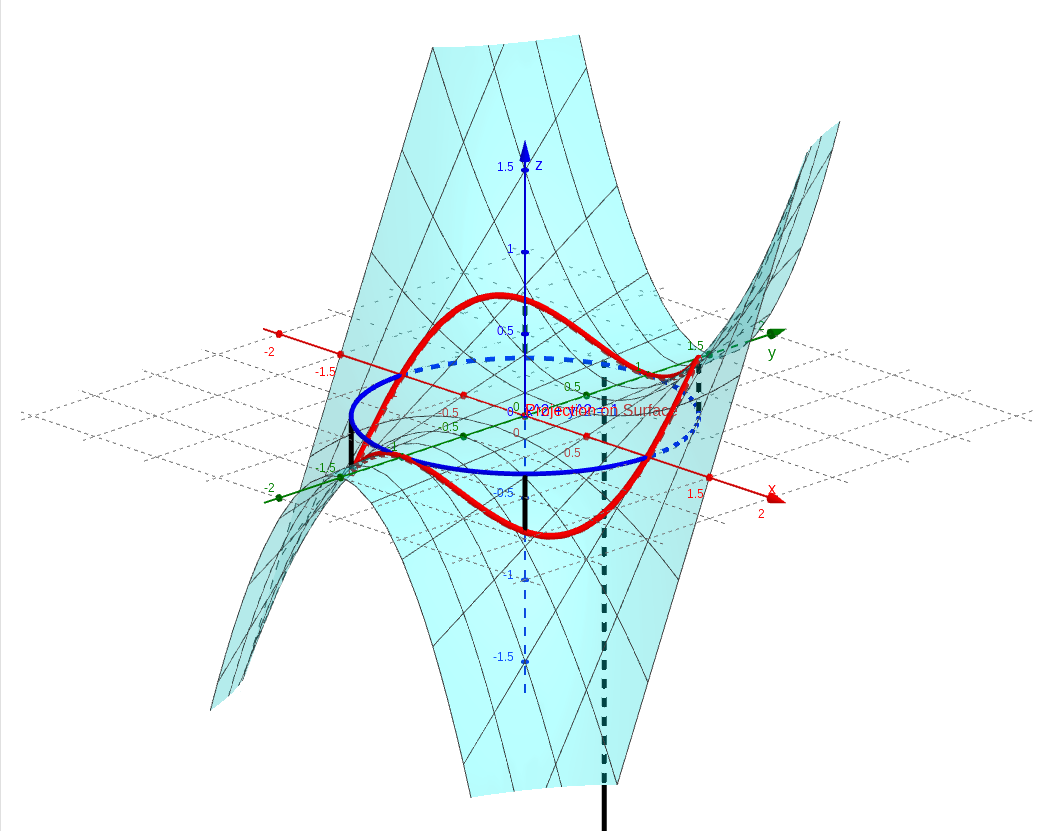
Question: Project x^2 + y^2 = 1 onto the surface f(x, y) = x^2y.
In this visualization, we watch, in 3D, how the unit circle
is "projected vertically" onto the two-variable surface
.
Core Concepts
-
Reference circle (blue curve): On the horizontal -plane (the plane ), we draw the circle . This is the source of the projection, think of it as a ring sitting on the ground.
-
Target surface (translucent teal surface): This surface is generated by . It's a typical 3D surface that rises and falls across quadrants as and change. For example, when is positive the surface sits above the -axis plane, and when is negative it sits below.
-
Projected curve (bold red curve): This is the focus of the visualization. Moving each point on the circle vertically (along the -direction) until it hits the surface traces out this red space curve. Mathematically, substituting the circle's parametric equations into the surface equation gives the space curve's coordinates: .
-
Projection links (grey dashed lines): To make the projection process clearer, we've added several vertical grey dashed lines. These segments connect each point on the plane to its corresponding point on the surface, showing how far each point stretches in the -direction.
Rotate the view to see how the red curve bends up and down following the surface's undulations, while always staying directly above or below the blue reference circle.