Plot Saddle Surface Tangent
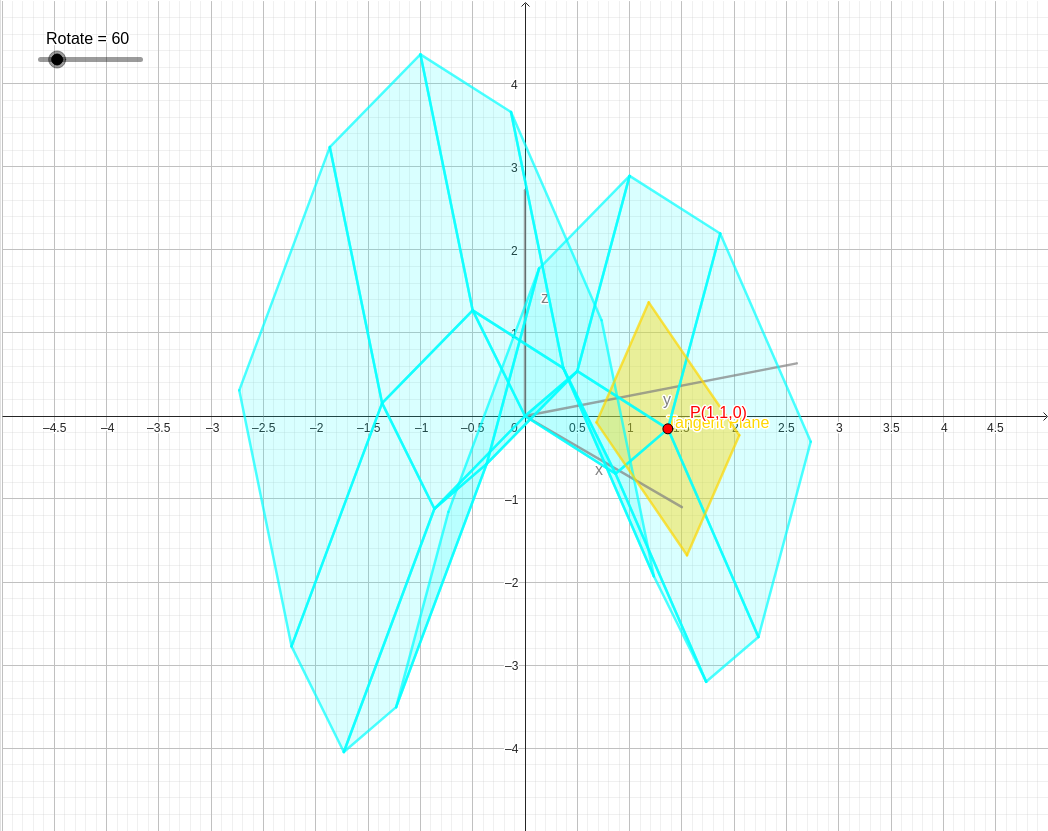
Question: Plot the saddle surface \(z = x^2 - y^2\) in 3D and show the tangent plane at the point \((1, 1, 0)\)
To visualize a saddle surface, also known as a hyperbolic paraboloid, we consider the equation
. This surface is named for its distinctive shape, which resembles a horse's saddle: it curves upward along one axis and downward along the other.
The Saddle Surface
The surface
has several defining characteristics:
- Parabolic Cross-sections: If you slice the surface along the plane , you see the parabola (opening upward). If you slice it along , you see (opening downward).
- Hyperbolic Traces: If you look at horizontal cross-sections (where is constant), the curves are hyperbolas. For example, at , we have the hyperbola .
- The Origin: At , the surface has a saddle point. It is a local minimum when moving along the -axis and a local maximum when moving along the -axis.
The Tangent Plane
At any specific point on the surface, the tangent plane provides the best linear approximation of the surface. To find the plane at
, we calculate the partial derivatives:
- Partial with respect to : . At , .
- Partial with respect to : . At , .
Using the tangent plane formula
, we get:
Visual Guide
In the interactive diagram:
- The Surface (Cyan): Represented by a grid, this shows the saddle shape. Notice how it dips down toward the -axis and rises toward the -axis.
- The Tangent Plane (Gold): A flat plane that just touches the surface at point P. Notice how the plane "kisses" the surface at and follows its slope locally.
- Point P (Red): Located at , this is the point of tangency.
- Rotation Slider: Use the slider to rotate the view. This helps in seeing how the plane sits flush against the curved surface.